Vehicle check time thresholds enable you to specify the ideal amount of time needed to complete an individual vehicle check.
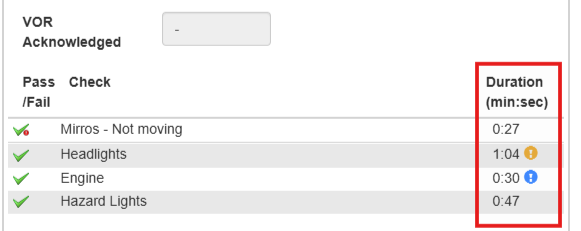
If a driver completes a check outside of this time frame, a warning icon will be displayed against it in the check details.
This can be very important in helping you find out if your drivers are taking the appropriate amount of time to do the inspections when completing their vehicle walkaround checks.
Enabling vehicle check time thresholds
To enable vehicle check time thresholds:
- Click ‘Settings’ in the main menu
- Click the ‘Mobile App’ tab
- Scroll down to the ‘Check Options’ section
- Enable the setting to ‘Enable Individual check time thresholds
- Enter the minimum and maximum durations in the fields that appear. The default settings will be Minimum: 10seconds, Maximum: 60seconds. But you can customise this to suit your requirements.
- Once you’ve entered your durations, click ‘Save’.
Reviewing check time thresholds
Once you’ve enabled check time thresholds, you will begin to see icons indicating whether a check has been completed above or below the specified threshold.
To review this:
- Click ‘Vehicle Details’ in the main menu
- Select the vehicle in the ‘Vehicles’ list
- In the ‘Check History’ section, if a check has one or more individual checks that were completed above or below the threshold, you will see a warning icon in the ‘Check Duration’ column
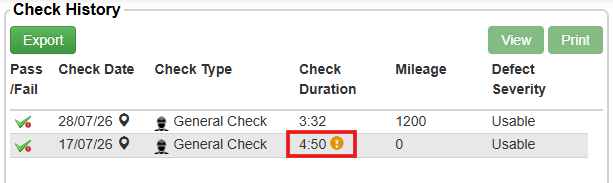
- Select the check in the table and click ‘View’
- In the popup window, you will then be able to review the individual checks completed, and see which ones were completed outside of the threshold. A blue icon will be shown if it has been completed under the minimum specified threshold, and an orange icon will be used if it has been completed over the maximum specified threshold.