
This article explains everything you need to know to help you understand the Stream API.
What is an API?
An API (Application Programming Interface) is essentially a digital messenger or middleman.
It allows two different software programs to communicate and exchange information with each other.
The primary use of the Stream API is to instantly and automatically send order information from a third-party system directly into Stream for delivery processing.
It can also send information out of Stream, like providing status updates or tracking links to the third-party system.
How does the API work?
When you upload a CSV file to Stream, you are sending a batch of orders.
All of the necessary details are packaged together in a clear, organised format, based on labelled column headers.
Integrating with the Stream API is similar.
You are still sending all the details for one or more orders, but instead of using a spreadsheet format like CSV, you use a digital data structure called a JSON object.
Think of JSON as a digital package of information.
Each field within the JSON package effectively does the same job as the column headers in the CSV upload.
Example JSON object:
"header": {
	"orderNo": "ABCD123456",
	"orderDate": "2022-07-23",
	"partner": { ... },
	"orderType": "COLLECTION",
	"orderCategory": "Freight",
	"serviceLevel": "Standard",
	"services": [ ... ],
	"customer": { ... },
	"customerOrderNo": "ABC1234567890",
	"orderNotes": "These notes relate to the order",
	"driverNotes": "These notes are for the driver",
	"cutOffTimeMet": true,
	"routeInfo": "CC05",
	"externalClientID": "XYZ12345678"
	"driverLinks": [ ... ]
	"updateAddresses": false
}

"collection": {
	+"address": { ... },
	+ "contact": { ... },
	+ "required": { ... },
	  "collectionMethod": "NORTH",
	+ "timeOnSite": { ... },
	  "bookingRequired": true,
	+ "items": [ ... ]
}
The Stream API is a RESTful web service, which is a standard that determines how the data is transferred from one system to another.
The four key methods that define a RESTful API are:
- POST (Create)
- GET (Retrieve)
- PATCH (Update)
- DELETE (Remove).
To use the RESTful API, you send your JSON package of order details to a specific URL , which is essentially the API’s digital address on the internet.
Interpreting the API documentation
Endpoints (HTTP Methods)
When you send a request to the API’s URL, you also need to specify what action you want to take. This is done with different endpoints (also known as HTTP methods), which tell Stream what to do with the data you are sending:
| Endpoint | Description | What it does with your order |
|---|---|---|
| POST | You are creating something new in Stream (i.e. Sending a new order) | You send a complete JSON object to the API’s URL to create a new delivery or collection order in the system. |
| GET | You just want to see the details of an existing order. | You send a request to the API’s URL to retrieve the current information for an order without changing anything. |
| PATCH | You are updating only a specific part of an existing order. | You send a request to the API’s URL to update a single detail (like changing a delivery note or address) on an existing order. |
| DELETE | You are permanently removing an existing order. | You send a request to the API’s URL to remove an existing order or an item from an order. |
When exploring the API documentation, you will notice these endpoints are detailed in the menu on the left-hand side.
Exploring an Endpoint
When you select an endpoint within the Stream API documentation, you will be able to see more detailed information about it:
| Detail | Description |
|---|---|
| Authorizations: OAuth2 | This is the Security Key. It means that before any data is sent, the system must perform a secure, temporary “handshake” (OAuth2) to get a token. This is what verifies that the system sending the order is authorized. |
| Header Parameters | These are like mandatory Digital Signatures that must be included with every single order package. |
| Stream-Nonce (pronounced “N-Once”) | This is the Unique Request ID, which is used to combat request duplication and can help with traceability and troubleshooting |
| Stream-Party | This is the Client’s ID or Party ID. It verifies which Stream account the new order belongs to. |
| Request Body schema: application/json | This simply says that the actual order data must be formatted as a JSON object (the “digital order form”) and that the developer needs to choose the correct template, such as the CollectionBody if they are creating a collection order. |
Within the “request body schema” section, with the correct order type selected (i.e. Delivery, Collection or Multi) you can expand the “header >” and “address >” information for more detailed information on each field of information, what is mandatory, how it should be formatted etc.
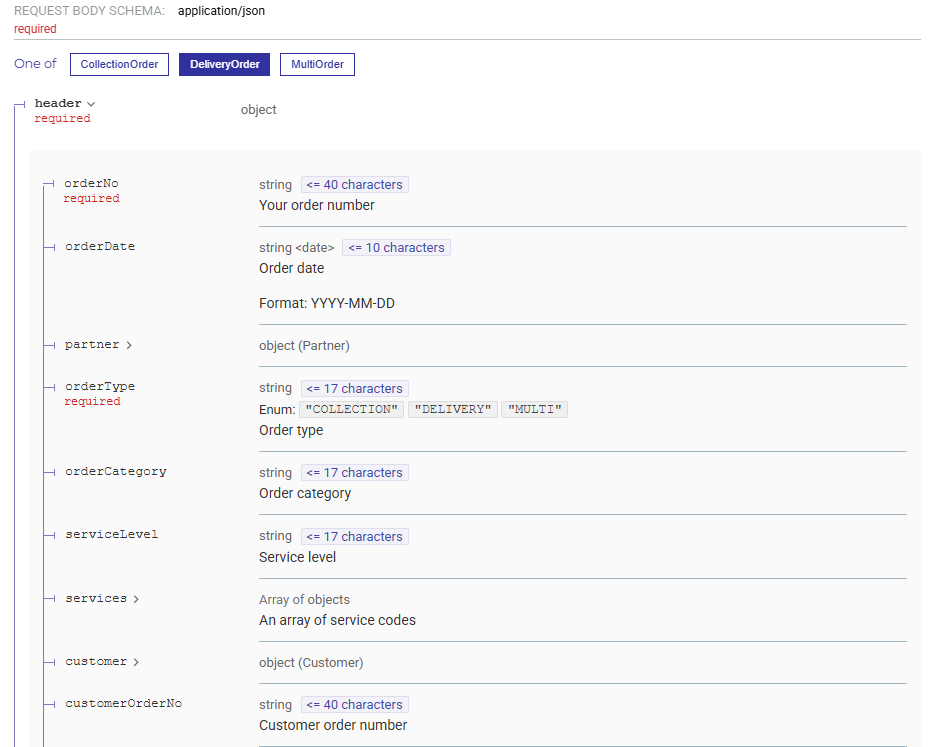
On the right-hand side of the screen, you will also see an example JSON request for that particular endpoint. This will show an example of each field (i.e. “orderDate”) and how we would expect to receive this data (“2022-07-23”).
Lastly, the Responses section at the bottom tells us what Stream will send back to the integrated system once it has received the request, depending on if it was successful or not.
Error Codes
If there is an issue when sending a message to the API, it will return an error code. These are detailed as follows:
- error – Serious error that means that the request could not be completed. E.g Unable to create an order
- warning – Some fields were incorrect or invalid however the request could still be completed. E.g Incorrect Stock Location code
- info – Informational messages that can normally be ignored.
Detailed information on each Error Code can be found within the API documentation.
Webhooks
A Webhook is a mechanism for Stream to automatically send data to a third-party system when a specific event occurs, such as an order status changing from ‘Confirmed’ to ‘Planned’.
Rather than the integrated system repeatedly sending “GET” requests, it can simply subscribe to a webhook once and Stream will send a message back whenever that event occurs.
In other words, this is like Stream promising, “I will call you immediately when the status changes,” instead of you having to constantly call Stream to ask if the status has changed.
Webhook messages are light weight in nature, and contain a small amount of information relevant to the event, such as dates, times and descriptions.
In some cases, other bits of information like links to photos or signatures are also included.
For help with Stream webhooks, check out our guide on Subscribing to webhooks.
Updates: Webhooks vs Polling
Certain information in Stream can be returned to the third-party system automatically using Webhooks.
However, some information can ONLY be retrieved using a GET request.
To reduce polling, these methods can be combined. An example of this would be:
- An order is delivered in Stream, which generates a webhook response to notify the third-party system the order is complete.
- This then triggers a GET request from the third-party system to retrieve order details not included in the webhook payload.
Steps to integrate:
Phase 1: Preparation and Setup
- Request Credentials and Access: The developer first contacts Stream to request the necessary API access credentials. This is usually the first step to enable the systems to communicate securely.
- Authentication Setup (OAuth2): The developer configures their system to use the secure industry-standard protocol, OAuth2, and makes a request to get a temporary, secure access token. This token acts as a key, allowing their system to talk to the Stream API.
- Unique Request Identifier (Stream-Nonce): They implement the Stream-Nonce header. This is a unique ID that must be sent with every request to prevent “replay attacks,” where a malicious user tries to resend an old, legitimate order request.
Phase 2: Connecting and Testing
- Determine URL (Endpoint): The developer identifies the specific API address (URL) they will use, ensuring they are connecting to the correct environment (e.g., UAT for testing or Production for live data).
- Build a JSON Object: They structure their order details into the required JSON Object format. This digital package contains all the necessary fields (data points) for the order.
- Test ‘Create’ (POST) Method: They test sending the JSON object to the URL using the POST method to successfully create a new order in Stream.
- Test ‘Retrieve’ (GET) Method: They test using the GET method to successfully retrieve the status and details of the newly created order.
Phase 3: Ongoing Data Management
- Implement Updates (PATCH) and Removal (DELETE): The developer integrates the PATCH method for making small changes (like updating a note) and the DELETE method for removing resources (like cancelling an order).
- Set Up Webhooks (Preferred for Status): Rather than constantly asking Stream for updates (polling), the developer configures their system to receive automatic notifications (Webhooks) from Stream whenever an order status changes (e.g., ‘Confirmed’ to ‘Planned’).
- Review Rate Limits: They confirm their system’s traffic will not exceed the documented Rate Limit (e.g., 200 requests per minute) to ensure stability for all users.
Typical integration workflow
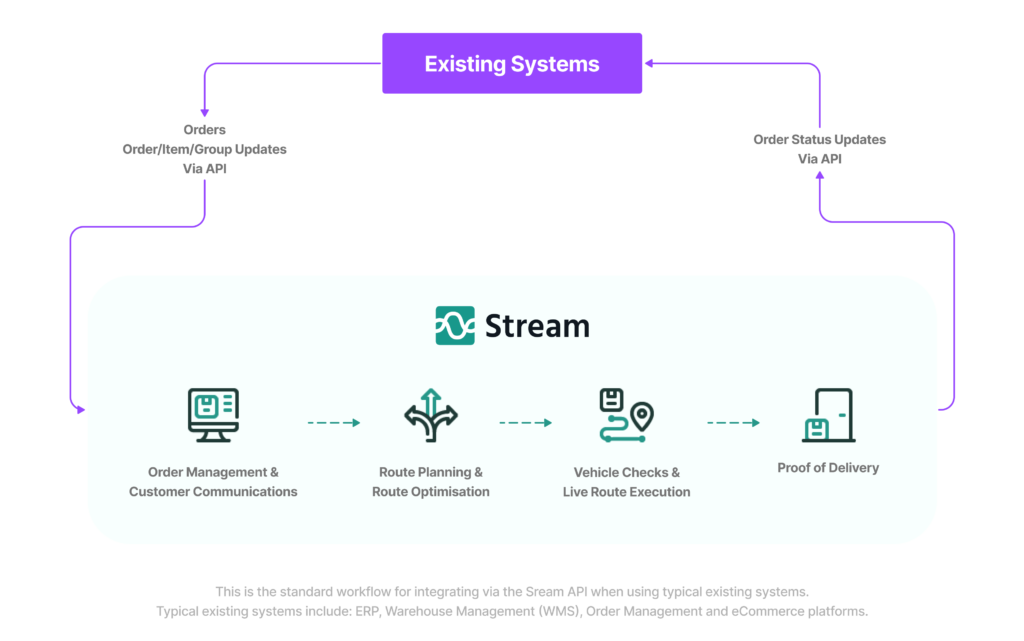
A typical data flow between the two systems would be as follows.
The third-party system would send orders (or jobs) into Stream to be processed and delivered/collected.
When they are completed, the status in Stream can be reflected back in the third-party system.
Additional integration use cases
Aside from the “typical” integration requirements of creating orders in Stream and/or retrieving tracking information, there are some other integration options available via the Stream API:
- Solutions – These endpoints allow run-level information to be retrieved and/or created Stream. This is also occasionally used in instances where route planning takes place outside of Stream, and planned routes (including drop sequence, driver, vehicle etc) can be passed into Stream.
- Products – The API can also be used to manage Products in Stream (as an alternative to uploading via CSV or creating manually). This allows all the usual item-level information to be posted, stored and updated in Stream against an SKU (weight, volume, barcode information etc)
- Pricing – This allows users to retrieve cost/charge information that is stored in Stream against each order, and would usually be extracted for invoicing purposes. As of today, it does not allow for pricing creation or updates (the same is true for all endpoints inc. Order Creation)
- Tracking – In addition to our standard API functionality detailed in our API documentation, we have a separate, dedicated tracking API. This is an event-based API, used primarily to integrate with marketplaces and sales platforms to provide valid tracking updates as an order progresses in Stream. If you would like to utilise the dedicated tracking API, please contact your Stream Account Manager
Stream API glossary
| Term | Definition |
|---|---|
| Alloc ID / Delivery Group Number | The internal ID for a delivery group, which refers to a single drop or collection stop within an order. |
| API (Application Programming Interface) | A software intermediary that allows two systems to exchange information in a structured and secure way. |
| Consignment ID | Stream’s internal, unique ID for the entire order (the order header). It is generated when the order is first created and is a key reference for all subsequent requests related to that order. (Also the primary reference number). |
| DELETE | The action used to remove a resource (e.g., delete an order, delete an item). |
| Endpoint | A specific URL within the API that performs a single task or offers a set of related functions. Examples: “Create an Order endpoint,” “Get Order Status endpoint.” |
| Field | An individual piece of data within a request or response (e.g. orderDate, deliveryAddressName, orderWeight). This is the equivalent of a column header in a spreadsheet. |
| GET | The action used to retrieve (get) information from Stream (e.g., get order status, get run data). |
| JSON Object (JavaScript Object Notation) | The standard, universally-readable format used by the API to structure and pass data. It organizes data in simple, readable key-value pairs (e.g. {“orderNumber”: “12345”}). |
| PATCH | The action used to update an existing resource in Stream (e.g. update a driver note, update an item quantity). |
| POST | The action used to push (create) a new resource in Stream (e.g. post a new order, post a new solution/run plan). |
| Stream-Nonce (N1’s) | A unique string that must be passed in the header of every request. Its purpose is to act as a system-wide identifier for the request and to prevent “replay attacks.” |
| Stream-Party | A header that contains the client’s Party ID (similar to the Client ID), used to verify that the party making the request is authorised. |
| Webhook | A mechanism for Stream to automatically send data to a customer’s external system when a specific event occurs, instead of the external system having to constantly check for updates. |