Customer service, route planning, real-time delivery tracking and proof of delivery are all important components of an effective delivery operation.
But at the end of the day, businesses want to know how much everything is costing, where their money is going, and what’s affecting their bottom line.
At a time when operating costs are stretched and profit margins squeezed, this has never been more important for a logistics operation.
Stream’s latest feature lets you calculate the total cost of a run. Plus, if you’re adding charges to your orders in Stream, it will enable you to get a clearer picture of the margin of a run.
And you can do all of this before the driver even departs on the run, giving you advanced visibility of whether a run is going to be profitable.
How does run costing work in Stream?
Run costing is the ability to generate a total cost for each of your delivery runs.
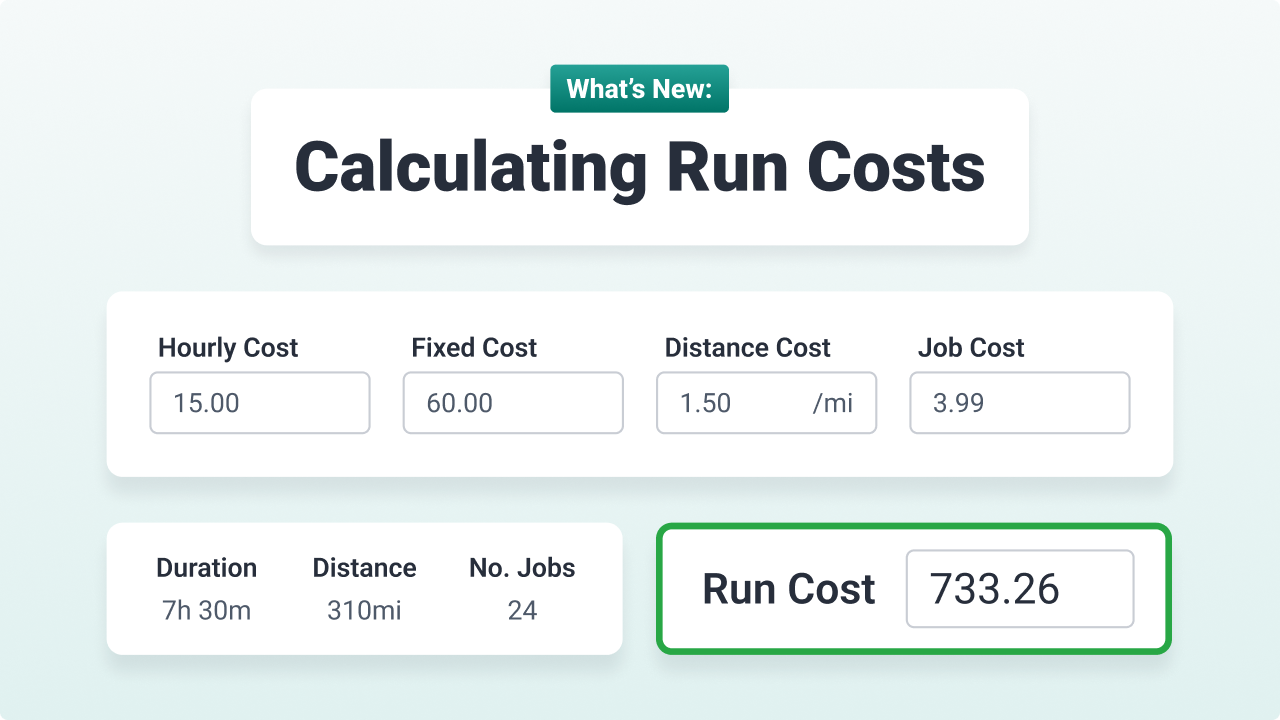
The total cost for a single run is calculated by taking the predefined costs associated with the vehicle being used and combining that with any additional costs you choose to manually add to the run.
Any charges applied to orders, such as delivery fees which are paid by the customer, will then be displayed and deducted from the total run cost, to give you the overall margin for the run.
Understanding the vehicle costs
- Hourly Cost – A cost that is applied for every hour that the vehicle is being used on a run [VALUE x run duration].
- Fixed Cost – A single fixed cost that is applied once, when the vehicle is used on a run.
- Distance Cost – A cost that is applied based on the distance covered on the run [VALUE x run mileage].
- Job Cost – A cost that is applied for each job (delivery/collection) on the run, calculated as [VALUE x no. drops].
Default vehicle costs can also be set against a ‘Vehicle Type’, meaning that any vehicle within that type will automatically use the associated costs.
The vehicle cost fields have been made flexible, as some businesses will determine certain costs in different ways to others.
For example, Company A may choose to include the driver’s pay against the ‘Hourly Cost’ field, whilst Company B may assign this as a fixed cost, and Company C may pay their driver per delivery and therefore assign it in the ‘Job Cost’ field.
Benefits of run costing
The great thing about run costing is that it provides businesses with a variety of benefits:
- Receive a realistic picture of how much each of your runs costs
- Uncover reasons why your runs might be operating at a loss
- Highlight cost inefficiencies in your delivery process
- The process can be automated, meaning less time spent looking for various costs from different places
Run costing use cases
You may be interested in generating and reviewing run costs if you want to:
- Understand exactly how much each of your delivery runs is costing your business
- Identify routes, vehicle types, or delivery types that generate the highest margins.
- Calculate whether your delivery runs are profitable and understand whether you are charging enough for your deliveries
- Create a benchmark to work out how you can reduce the overall cost of your delivery runs
How do I calculate costs for my runs?
For details on how to calculate run costs in Stream, check out our knowledge base article Generating Run Costs.