Managing your commerce and logistics operation can be complex enough – orders, inventory, warehousing, route planning, customer service – the list goes on.
Add into the mix managing marketplace listings and providing valid tracking information for orders self-delivered from marketplaces such as Amazon, eBay and Temu and the hours of manual process can be overwhelming.
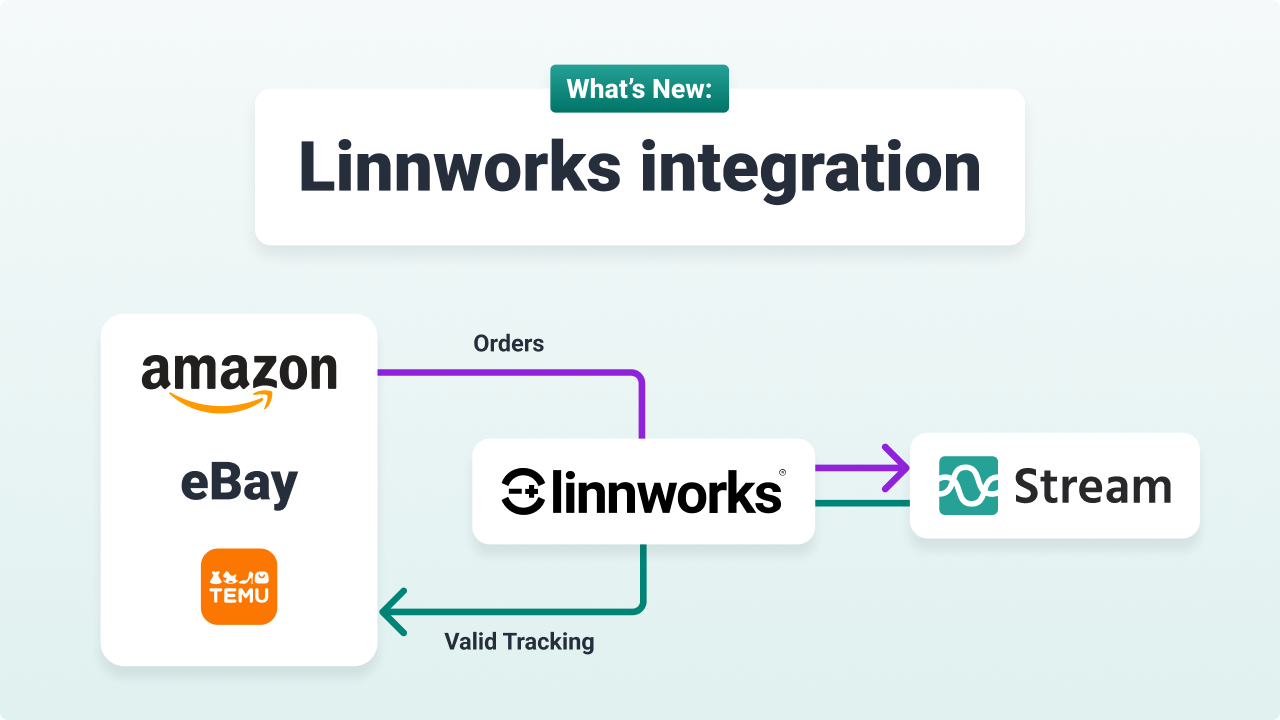
Now you can automate even more of those processes with an extension to our existing Linnworks integration which enables merchants to automatically update Amazon, eBay and Temu with the information required for valid tracking on self-delivered orders:
- Selects Stream as the recognised carrier in each marketplace
- Adds the Stream tracking ID to each order.
What is the Linnworks Integration?
By connecting Linnworks with Stream users create a seamless order-to-delivery ecosystem.
As well as automating the process of updating marketplace information, the Linnworks to Stream integration allows you to automatically synchronise order data, plan your own-fleet deliveries using Stream’s advanced Route Optimisation features, and provide end-to-end customer tracking and electronic Proof of Delivery (ePOD) services, all while keeping your Linnworks records instantly updated.
What are the key benefits and use cases of the Linnworks Integration?
Connecting Linnworks with Stream enables you to manage your entire order-to-delivery lifecycle within a single, unified workflow.
Automated order creation
Orders created or modified in Linnworks are automatically pushed into Stream, ready for delivery planning. This eliminates the need to manually export and import order files, saving time and ensuring data consistency.
Optimised delivery routes
Once orders are in Stream, you can utilise our Route Planning and Route Optimisation features to plan efficient multi-drop delivery routes in just a few simple steps. This helps reduce mileage, lower fuel costs, and increase the number of deliveries your drivers can complete at scale.
Complete data sync
The integration ensures that data flows continuously between the two platforms. As a delivery progresses, Stream pushes tracking and completion information back to Linnworks. This enables you to:
- Retrieve tracking information from Stream and update it in Linnworks.
- Create shipping labels (including multi-consignment labels) directly within Linnworks.
- Cancel shipping labels from within Linnworks (provided the manifest has not been filed).
Customer (and marketplace) visibility
Send your customers automated email and text notifications, keeping them informed every step of the way. When the delivery is complete, our Driver App captures full Electronic Proof of Delivery (ePOD), including signatures and photos, which is then recorded in both Stream and Linnworks.
Valid tracking information can also be provided to marketplaces to help you protect your account health and minimise items not delivered claims and disputes.
Learn more about how LInnworks helps you manage listings across leading marketplaces.
How do I get the Linnworks and marketplace integrations?
The Linnworks and marketplace integrations are available to all Stream customers.
If you are an existing customer and would like to learn more about setting up the integration, please contact our Sales Team.
If you’re new to Stream and use Linnworks to manage your commerce operations, you can schedule a demo. One of our specialists will demonstrate how these integrations will transform your order management and delivery process, helping you plan less and deliver more.